3D viewer
MuJoCo provides an official viewer application, written in C++, which can also be used in MuJoCo’s Python package. To avoid C++ dependencies, MuJoCo-rs provides its own 3D viewer, written in Rust.
We also provide the ability to use the official C++ based viewer, however this requires static linking to modified MuJoCo code, as described in Static linking.
Rust-native 3D viewer
Rust-native 3D viewer supports visualization of the 3D scene, as well as interaction via mouse and keyboard.
This also includes object perturbations. Optionally, enabled by the viewer-ui feature (default), the viewer
also provides a user interface, which tries to replicate the original C++ viewer as best as possible
and thus allows control of constraints, joints, actuators, etc.
A screenshot of the Rust 3D viewer is shown below.
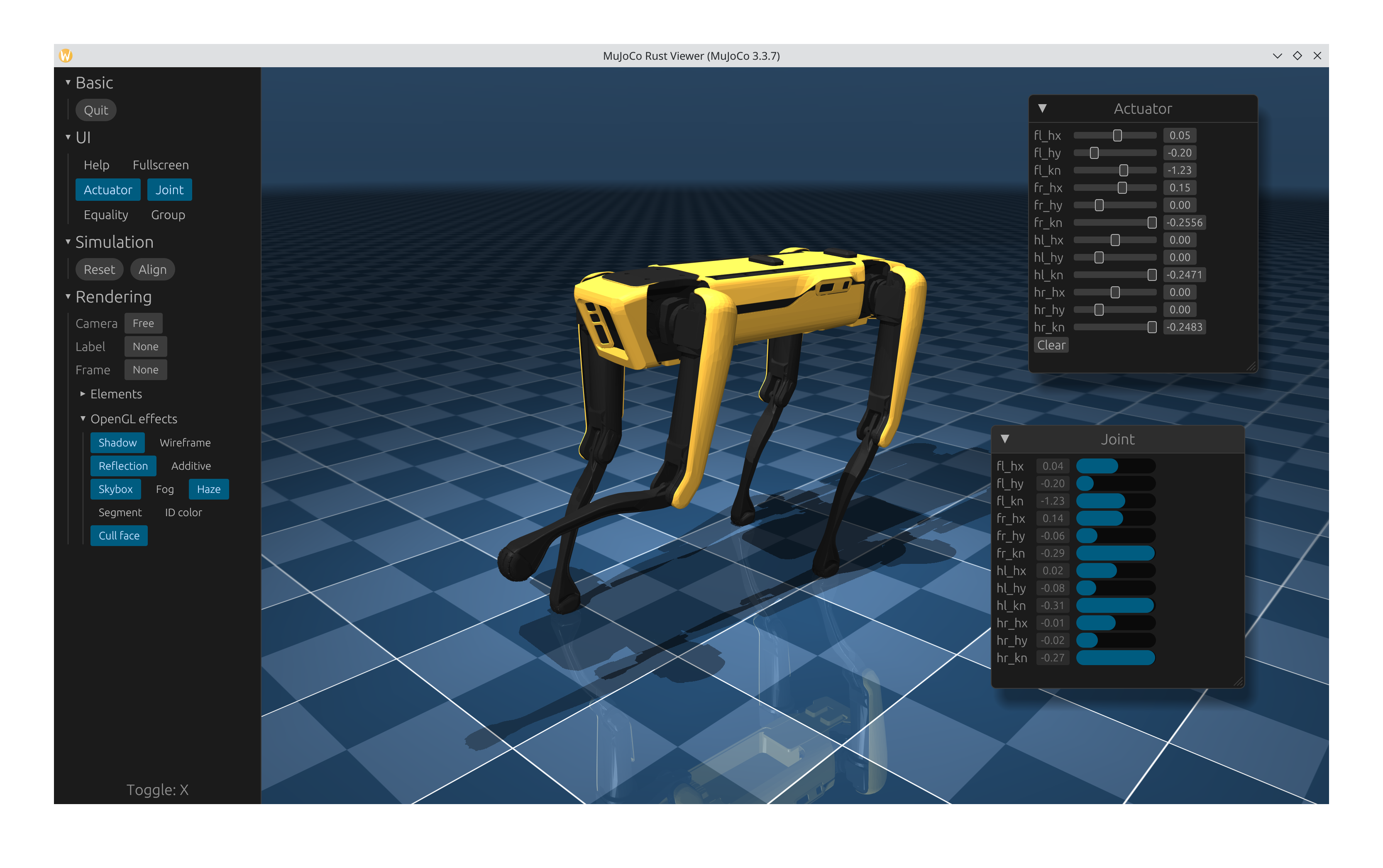
Rust-native interactive 3D viewer. Showing the Spot scene from MuJoCo’s menagerie.
The viewer can be launched only in passive mode, i.e. it won’t run as a separate application, and needs to be periodically “synced” by the user application. The user application is the one that needs to run the actual physics simulation, like shown in Basic simulation and also below.
The viewer can be launched with MjViewer::launch_passive, like shown in the following (single-threaded) example:
fn main() {
    /* Initiate the physics simulation */
    let model = MjModel::from_xml("path/to/model.xml").expect("could not load the model");
    let mut data = MjData::new(&model);
    let timestep = model.opt().timestep;

    /* Launch the viewer  */
    let mut viewer = MjViewer::launch_passive(&model, 100).expect("could not launch the viewer");
    while viewer.running() {
        /* Sync the simulation state with the viewer */
        viewer.sync_data(&mut data);
        viewer.render();

        /* Update the simulation state */
        data.step();
        std::thread::sleep(Duration::from_secs_f64(timestep));  // wait approximately timestep seconds
    }
}
The above example runs until the viewer is closed (MjViewer::running) and mirrors/syncs the simulation state with MjViewer::sync_data. After or parallel to synchronization, the viewer must also be rendered using the MjViewer::render method.
...
while viewer.running() {
    /* Sync the simulation state with the viewer */
    viewer.sync_data(&mut data);
    viewer.render();
    ...
}
At the beginning, we also obtained the simulation timestep (time passed in simulation per each call to
MjData::step), which is used to
sleep after the step with std::thread::sleep(Duration::from_secs_f64(timestep));.
This is optional and can be removed or reduced to run the simulation faster than realtime.
Note
The sleep() function is not accurate. For accurate timing,
use std::time::Instant to poll the elapsed time.
Performance tip
Rust viewer contains the so called shared state (ViewerSharedState), which exists to allow partial multi-threading, without locking the entire viewer.
Methods that operate on the shared state, such as:
etc.;
internally acquire a mutex lock to the shared state. Sequential calls to more than one of these can consequently hurt performance.
A more optimized way to use these methods is to call their equivalents on the shared state directly. The shared state can be accessed mainly through:
MjViewer::state, which returns an
Arc<Mutex<ViewerSharedState>>— see Multi-threading;MjViewer::with_state_lock, which accepts a function/closure to call. The function/closure receives a MutexGuard to the shared state.
Multi-threading
Above example shows how to use the viewer synchronously to the simulation loop. This can slow down the simulation as MjViewer::render is relatively expensive to call. Additionally, usage synchronous to simulation causes the refresh rate to be equal to the simulation stepping frequency, which puts strain to the GPU.
To prevent slowdowns and allow V-Sync, the viewer can run in the main thread, whilst the actual physics simulation runs in another.
Here’s a cutout from the example on how to use the viewer in a multi-threaded way:
let model = Arc::new(MjModel::from_xml_string(EXAMPLE_MODEL).expect("could not load the model"));
let mut data = MjData::new(model.clone());

// Create the viewer, bound to the model.
let mut viewer = MjViewer::builder()
    .max_user_geoms(100)
    .vsync(true)  // let the viewer select the appropriate refresh rate.
    .build_passive(model.clone())
    .expect("could not launch the viewer");

let shared_state = viewer.state().clone();
let mut viewer_running = shared_state.lock().unwrap().running();  // gets moved into the thread
let physics_thread = std::thread::spawn(move || {
    while viewer_running {
        let timer = Instant::now();
        data.step();
        {
            let mut lock = shared_state.lock().unwrap();
            lock.sync_data(&mut data);
            viewer_running = lock.running();
        }

        // Use a while loop and polling to wait for accuracy purposes.
        // To increase performance, std::thread::sleep may be used,
        // however that comes at the cost of less accuracy.
        while timer.elapsed().as_secs_f64() < model.opt().timestep {}
    }
});

while viewer.running() {
    viewer.render();
}

physics_thread.join().unwrap();
The example mainly differs from the synchronous one in the highlighted lines:
mujoco_rs::wrappers::mj_model::MjModel is wrapped into Arc,
Data is synced through ViewerSharedState::sync_data;
ViewerSharedState is obtained through MjViewer::state, which returns
Arc<Mutex<ViewerSharedState>>;
Custom UI widgets
The Rust-native viewer supports adding custom UI widgets through the MjViewer::add_ui_callback method. This allows you to create custom windows, panels, and other UI elements using egui.
Note
Callbacks added via MjViewer::add_ui_callback receive the passive simulation state (MjData). This requires locking the mutex to the shared state, which may slow down the program.
To avoid unnecessary locks when the simulation state is not required in the UI, MjViewer::add_ui_callback_detached can be used instead, which only accepts the egui::Context as parameter.
The following example demonstrates how to add a custom window to the viewer:
fn main() {
    let model = MjModel::from_xml_string(EXAMPLE_MODEL).expect("could not load the model");
    let mut data = MjData::new(&model);
    let mut viewer = MjViewer::launch_passive(&model, 100)
        .expect("could not launch the viewer");

    /* Add a custom UI window */
    // viewer.add_ui_callback_detached(|ctx| {...}) or
    viewer.add_ui_callback(|ctx, data| {
        use mujoco_rs::viewer::egui;
        egui::Window::new("Custom controls")
            .scroll(true)
            .show(ctx, |ui| {
                ui.heading("My Custom Widget");
                ui.label("This is a custom UI element!");
                if ui.button("Click me").clicked() {
                    println!("Button clicked!");
                }
            });
    });

    while viewer.running() {
        viewer.sync_data(&mut data);
        viewer.render();
        data.step();
        std::thread::sleep(Duration::from_millis(2));
    }
}
Multiple callbacks can be registered by calling add_ui_callback multiple times.
Each callback will be invoked during the UI rendering phase with access to the egui context.
For a comprehensive example, see the custom_ui_widgets.rs example, which demonstrates various types of UI elements including windows, side panels, and top panels.
Note
Custom UI widgets are only available when the viewer-ui feature is enabled (default).
The egui crate is re-exported from mujoco_rs::viewer::egui for convenience.
Attention
For performance reasons, when MjViewer::sync_data is called, the viewer only syncs the state required for visualization — i.e., it skips some large arrays. As a result, the MjData passed to the callback (added via MjViewer::add_ui_callback) may contain outdated information.
The following are NOT SYNCHRONIZED when using MjViewer::sync_data:
Jacobian matrices;
mass matrices.
If you require those, make sure to call an appropriate method/function on the passed MjData instance (e.g., MjData::forward).
Instead of MjViewer::sync_data, users can call MjViewer::sync_data_full, which will copy the entire MjData struct at the expense of performance.
Wrapper of MuJoCo’s C++ 3D viewer
MuJoCo-rs also provides a wrapper around a modified MuJoCo’s C++ 3D viewer. Modifications to the C++ viewer are minor with the purpose of preserving future compatibility. The changes to the viewer are made to allow viewer rendering in a user-controller loop.
Attention
To avoid a major rewrite of the C++ viewer, the latter is given raw, mutable pointers to both mujoco_rs::mujoco_c::mjModel and mujoco_rs::mujoco_c::mjData, which are wrapped inside mujoco_rs::wrappers::mj_model::MjModel and mujoco_rs::wrappers::mj_data::MjData, respectively. As a result, Rust’s borrow-checker rules are violated. Although incorrect behavior is unlikely, caution is advised.
It is strongly recommended to use the Rust-native 3D viewer when none of the C++ viewer’s features are required.
Here is an example of using the C++ wrapper:
fn main() {
    let model = MjModel::from_xml_string(EXAMPLE_MODEL).expect("could not load the model");
    let mut data = MjData::new(&model);
    let mut viewer = MjViewerCpp::launch_passive(&model, &data, 100);
    let step = model.opt().timestep;
    while viewer.running() {
        viewer.sync();
        viewer.render(true);  // render on screen   and update the fps timer
        data.step();
        std::thread::sleep(Duration::from_secs_f64(step));
    }
}
Compared to the Rust-native viewer, the C++ wrapper doesn’t take a data parameter to the sync
method. Additionally, a call to MjViewerCpp::render
is required.