3D viewer
MuJoCo provides an official viewer application, written in C++, which can also be used in MuJoCo’s Python package. To avoid C++ dependencies, MuJoCo-rs provides its own 3D viewer, written in Rust.
We also provide the ability to use the official C++-based viewer; however, this requires static linking to modified MuJoCo code, as described in Static linking.
Rust-native 3D viewer
Note
The viewer requires the viewer Cargo feature (not enabled by default).
Enable it with: cargo add mujoco-rs --features viewer
(or viewer-ui for UI support).
The Rust-native 3D viewer, enabled by the viewer feature, supports visualization of the 3D scene, as well as interaction via mouse and keyboard.
This also includes object perturbations. Optionally, enabled by the viewer-ui feature, the viewer
also provides a user interface, which tries to replicate the original C++ viewer as best as possible
(while simultaneously enriching it) and thus allows control of constraints, joints, actuators, etc.
A screenshot of the Rust 3D viewer is shown below.
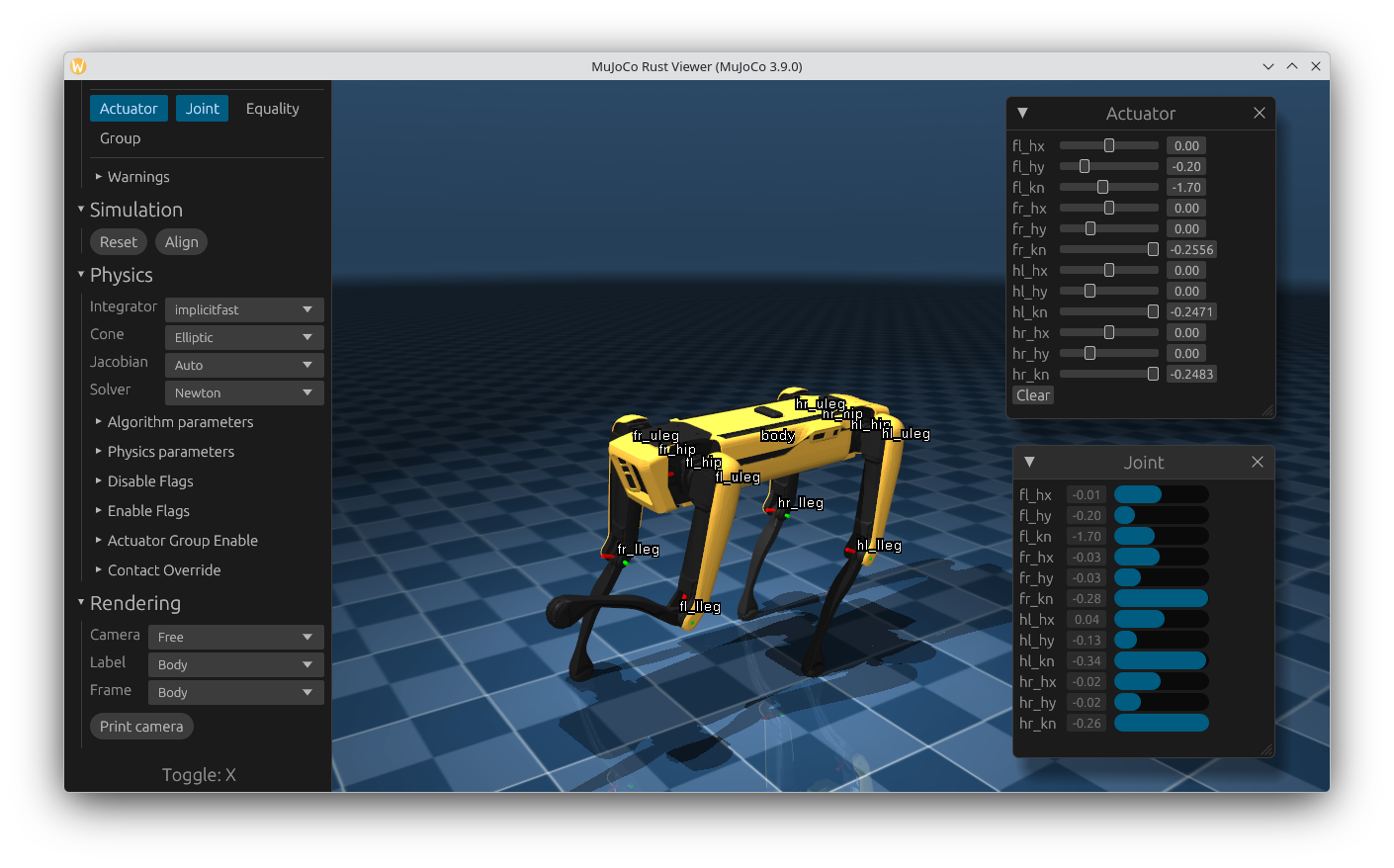
Rust-native interactive 3D viewer. Showing the Spot scene from MuJoCo’s menagerie.
The viewer can be launched only in passive mode, i.e. it won’t run as a separate application, and needs to be periodically “synced” by the user application. The user application is the one that needs to run the actual physics simulation, as shown in Basic simulation and also below.
The viewer can be launched in two ways:
Via its builder (MjViewer::builder), which allows full control over the viewer’s settings:
use std::time::Duration;

use mujoco_rs::viewer::MjViewer;
use mujoco_rs::prelude::*;

fn main() {
    /* Initiate the physics simulation */
    let model = MjModel::from_xml("path/to/model.xml").expect("could not load the model");
    let mut data = MjData::new(&model);
    let timestep = model.opt().timestep;

    /* Launch the viewer  */
    let mut viewer = MjViewer::builder()
        .window_name("My Simulation")    // text shown in the window title bar.
        .max_user_geoms(0)               // maximum additional geoms drawn by the user.
        .vsync(false)                    // vertical synchronization (use true when rendering in a separate thread).
        .warn_non_realtime(false)        // show an overlay when the simulation lags behind realtime.
        .build_passive(&model).expect("could not launch the viewer");
    while viewer.running() {
        /* Sync the simulation state with the viewer */
        viewer.sync_data(&mut data);
        viewer.render().unwrap();

        /* Update the simulation state */
        data.step();
        std::thread::sleep(Duration::from_secs_f64(timestep));  // wait approximately timestep seconds
    }
}
Via the MjViewer::launch_passive method, a convenient shorthand for users who want the default settings:
use std::time::Duration;

use mujoco_rs::viewer::MjViewer;
use mujoco_rs::prelude::*;

fn main() {
    let model = MjModel::from_xml("path/to/model.xml").expect("could not load the model");
    let mut data = MjData::new(&model);
    let timestep = model.opt().timestep;

    let mut viewer = MjViewer::launch_passive(&model, 0).expect("could not launch the viewer");
    while viewer.running() {
        viewer.sync_data(&mut data);
        viewer.render().unwrap();
        data.step();
        std::thread::sleep(Duration::from_secs_f64(timestep));
    }
}
The above example runs until the viewer is closed (MjViewer::running) and mirrors/syncs the simulation state with MjViewer::sync_data. After synchronization, or in parallel with it, the viewer must also be rendered using the MjViewer::render method.
...
while viewer.running() {
    /* Sync the simulation state with the viewer */
    viewer.sync_data(&mut data);
    viewer.render().unwrap();
    ...
}
At the beginning, we also obtained the simulation timestep (time passed in simulation for each call to
MjData::step), which is used to
sleep after the step with std::thread::sleep(Duration::from_secs_f64(timestep));.
This is optional and can be removed or reduced to run the simulation faster than realtime.
Note
The sleep() function is not accurate. For accurate timing,
use std::time::Instant to poll the elapsed time.
Note
MjViewer::sync_data copies only the fields
of MjData required for visualization
(kinematics, contacts, sensor data, etc.), skipping large computed arrays
(mass matrices, constraint arrays efc_*/iefc_* including constraint Jacobians). This is faster.
MjViewer::sync_data_full copies the entire
MjData struct and should only be used when those large arrays are needed inside the
viewer (for example, when using
MjViewer::add_ui_callback to access them).
Performance tip
The Rust viewer contains the so-called shared state (ViewerSharedState), which exists to allow partial multi-threading, without locking the entire viewer.
Methods that operate on the shared state, such as:
etc.;
internally acquire a mutex lock to the shared state. Sequential calls to more than one of these can consequently hurt performance.
A more optimized way to use these methods is to call their equivalents on the shared state directly. The shared state can be accessed mainly through:
MjViewer::state, which returns an
&Arc<Mutex<ViewerSharedState>>— see Multi-threading;MjViewer::with_state_lock, which accepts a function/closure to call. The function/closure receives a MutexGuard to the shared state.
Using with_state_lock groups multiple shared-state operations under a single lock
acquisition, which avoids repeated lock/unlock overhead:
viewer.with_state_lock(|mut lock| {
    lock.sync_data(&mut data);  // both calls share one lock
    viewer_running = lock.running();
}).unwrap();
Multi-threading
The above example shows how to use the viewer synchronously with the simulation loop. This can slow down the simulation as MjViewer::render is relatively expensive to call. Additionally, synchronous usage with the simulation causes the refresh rate to be equal to the simulation stepping frequency, which puts strain on the GPU.
To prevent slowdowns and allow V-Sync, the viewer can run in the main thread, while the actual physics simulation runs in another.
Here’s an adapted excerpt from the example on how to use the viewer in a multi-threaded way:
let model = Arc::new(MjModel::from_xml_string(EXAMPLE_MODEL).expect("could not load the model"));
let mut data = MjData::new(model.clone());

// Create the viewer, bound to the model.
let mut viewer = MjViewer::builder()
    .window_name("My Threaded Simulation")  // text shown in the window title bar.
    .max_user_geoms(100)
    .vsync(true)  // let the viewer select the appropriate refresh rate.
    .build_passive(model.clone())
    .expect("could not launch the viewer");

let shared_state = viewer.state().clone();
let mut viewer_running = shared_state.lock().unwrap().running();  // gets moved into the thread
let physics_thread = std::thread::spawn(move || {
    while viewer_running {
        let timer = Instant::now();
        data.step();
        {
            let mut lock = shared_state.lock().unwrap();
            lock.sync_data(&mut data);
            viewer_running = lock.running();
        }

        // Use a while loop and polling to wait for accuracy purposes.
        // To increase performance, std::thread::sleep may be used,
        // however that comes at the cost of less accuracy.
        while timer.elapsed().as_secs_f64() < model.opt().timestep {}
    }
});

while viewer.running() {
    viewer.render().unwrap();
}

physics_thread.join().unwrap();
The example mainly differs from the synchronous one in the highlighted lines:
mujoco_rs::wrappers::mj_model::MjModel is wrapped into Arc,
Data is synced through ViewerSharedState::sync_data;
ViewerSharedState is obtained through MjViewer::state, which returns
&Arc<Mutex<ViewerSharedState>>,both calls to
sync_dataandrunningare grouped inside a singlelock()to avoid two separate mutex acquisitions (see the performance tip above).
Custom UI widgets
The Rust-native viewer supports adding custom UI widgets through the MjViewer::add_ui_callback method. This allows you to create custom windows, panels, and other UI elements using egui.
Note
Callbacks added via MjViewer::add_ui_callback receive the passive simulation state (MjData). This requires locking the mutex to the shared state, which may slow down the program.
To avoid unnecessary locks when the simulation state is not required in the UI, MjViewer::add_ui_callback_detached can be used instead, which only accepts the egui::Context as a parameter.
The following example demonstrates how to add a custom window to the viewer:
use std::time::Duration;

use mujoco_rs::viewer::MjViewer;
use mujoco_rs::prelude::*;

const EXAMPLE_MODEL: &str = r#"<mujoco><worldbody/></mujoco>"#;

fn main() {
    let model = MjModel::from_xml_string(EXAMPLE_MODEL).expect("could not load the model");
    let mut data = MjData::new(&model);
    let mut viewer = MjViewer::builder()
        .max_user_geoms(0)
        .build_passive(&model).expect("could not launch the viewer");

    /* Add a custom UI window */
    // viewer.add_ui_callback(|ctx, data| {...}) or
    viewer.add_ui_callback_detached(|ctx| {
        use mujoco_rs::viewer::egui;
        egui::Window::new("Custom controls")
            .scroll(true)
            .show(ctx, |ui| {
                ui.heading("My Custom Widget");
                ui.label("This is a custom UI element!");
                if ui.button("Click me").clicked() {
                    println!("Button clicked!");
                }
            });
    });

    while viewer.running() {
        viewer.sync_data(&mut data);
        viewer.render().unwrap();
        data.step();
        std::thread::sleep(Duration::from_millis(2));
    }
}
Multiple callbacks can be registered by calling add_ui_callback multiple times.
Each callback will be invoked during the UI rendering phase with access to the egui context.
For a comprehensive example, see the visualization/viewer/custom_ui_widgets.rs example, which demonstrates various types of UI elements including windows, side panels, and top panels.
Note
Custom UI widgets are only available when the viewer-ui feature is enabled.
The egui crate is re-exported from mujoco_rs::viewer::egui for convenience.
Attention
When MjViewer::sync_data is called, the
user’s data is copied into the viewer’s internal passive copy via mjv_copyData, which
skips large computed arrays not required for visualization. As a result, the
MjData passed to UI callbacks
(added via MjViewer::add_ui_callback)
will not contain:
mass matrices (
qM,qLD,qLDiagInv,qLU);constraint arrays (
efc_*,iefc_*, including constraint Jacobians).
If you require those in a UI callback, either call an appropriate method on the passed MjData instance (e.g., MjData::forward), or switch to MjViewer::sync_data_full.
Additionally, the viewer writes any UI-driven state changes (e.g. actuator controls,
equality constraints) back to the user’s data via the integration state. If your
code relies on derived quantities such as previously-computed Jacobians, recompute them
after each MjViewer::sync_data call.
Model Parameter Synchronization
The viewer provides methods to synchronize model parameters (opt, vis,
stat) between the simulation and the viewer’s passive internal state.
The primary method is ViewerSharedState::sync_model_opt, ViewerSharedState::sync_model_vis, and ViewerSharedState::sync_model_stat:
viewer.with_state_lock(|mut lock| {
    lock.sync_model_opt(data.model_opt_mut());
    lock.sync_model_vis(data.model_vis_mut());
    lock.sync_model_stat(data.model_stat_mut());
}).unwrap();
This requires the M bound inside MjData to be DerefMut<Target = MjModel> (e.g., Box<MjModel>).
Asset re-upload
When textures, meshes, or heightfields in the simulation model are mutated at runtime, the GPU copies held by the viewer must be refreshed explicitly.
Both MjViewer and ViewerSharedState expose two sets of methods for this:
Singular – upload one asset by its zero-based index: MjViewer::update_texture_from, MjViewer::update_mesh_from, MjViewer::update_hfield_from. These copy only the data for the specified asset ID and are efficient when only a small number of assets change per frame.
Plural – upload all assets of a type in bulk: MjViewer::update_textures_from, MjViewer::update_meshes_from, MjViewer::update_hfields_from. The plural methods copy entire asset arrays (skipping per-asset offset calculations) and are more efficient when the majority of assets of a given type are modified. Note that mesh uploads copy multiple arrays (vertex positions, per-vertex normals, UV texture coordinates, face-vertex indices, face-normal indices, face-texcoord indices, and convex hull graph data), so
update_meshes_fromissues several array copies.
Both call paths require model.signature() to match the viewer’s internal passive model
and return Result<(), MjViewerError> —
MjViewerError::SignatureMismatch is returned when
the signatures differ, and
MjViewerError::IndexOutOfBounds when the asset ID
is out of range (singular methods only).
If the model has been replaced or reloaded, call
MjViewer::sync_model or
MjViewer::sync_data first to bring the viewer’s
passive copy up to date before issuing any asset re-upload.
The viewer stages the upload and applies it on the next call to MjViewer::render.
use mujoco_rs::viewer::MjViewer;
use mujoco_rs::prelude::*;

fn main() {
    // Box the model so MjData takes ownership; the viewer makes its own internal copy.
    let model = Box::new(MjModel::from_xml("path/to/model.xml").expect("could not load the model"));
    let mut data = MjData::new(model);
    let mut viewer = MjViewer::launch_passive(data.model(), 0).expect("could not launch the viewer");

    while viewer.running() {
        viewer.sync_data(&mut data);

        /* Mutate texture 0 in the model, then re-upload just that texture */
        // SAFETY: only non-structural asset arrays (tex_data) are modified.
        unsafe { data.model_mut() }.tex_data_mut()[..256].fill(128);
        viewer.update_texture_from(data.model(), 0).unwrap();

        /* Or re-upload all textures at once */
        viewer.update_textures_from(data.model()).unwrap();

        /* Staged uploads are applied during render() */
        viewer.render().unwrap();
        data.step();
    }
}
Wrapper of MuJoCo’s C++ 3D viewer
MuJoCo-rs also provides a wrapper around a modified version of MuJoCo’s C++ 3D viewer. Modifications to the C++ viewer are minor with the purpose of preserving future compatibility. The changes to the viewer are made to allow viewer rendering in a user-controlled loop.
Note
This wrapper requires the cpp-viewer Cargo feature to be enabled.
Attention
To avoid a major rewrite of the C++ viewer, the latter is given raw, mutable pointers to both mujoco_rs::mujoco_c::mjModel and mujoco_rs::mujoco_c::mjData, which are wrapped inside mujoco_rs::wrappers::mj_model::MjModel and mujoco_rs::wrappers::mj_data::MjData, respectively. As a result, Rust’s borrow-checker rules are violated. Although incorrect behavior is unlikely, caution is advised.
It is strongly recommended to use the Rust-native 3D viewer when none of the C++ viewer’s features are required.
Here is an example of using the C++ wrapper:
use std::time::Duration;

use mujoco_rs::cpp_viewer::MjViewerCpp;
use mujoco_rs::prelude::*;

const EXAMPLE_MODEL: &str = r#"<mujoco><worldbody/></mujoco>"#;

fn main() {
    let model = MjModel::from_xml_string(EXAMPLE_MODEL).expect("could not load the model");
    let mut data = MjData::new(&model);
    // SAFETY: model and data are kept alive and at a stable address.
    let mut viewer = unsafe { MjViewerCpp::launch_passive(&model, &data, 100) };
    let step = model.opt().timestep;
    while viewer.running() {
        viewer.sync();
        // SAFETY: called from the main thread.
        unsafe { viewer.render().unwrap() };
        data.step();
        std::thread::sleep(Duration::from_secs_f64(step));
    }
}
Unlike the Rust-native viewer, the C++ wrapper’s
sync does not take a data
parameter; it uses the raw pointer passed at construction time.